Showing posts with label Android. Show all posts

Thursday, 16 January 2014

Google Glass

Google Glass is one of a smart product of Google, which can simply be defined as a computer that you can wear. Google Glass is so intelligent that it can be operated by your voice command. Functionally Google Glass is developed for taking pictures, recording videos, sending text messages etc. Google is offering its Google Glass with Android version 4.0.4 with display size of 640x360 pixels. Its RAM is 680GB and is provided with storage capacity of 16GB. Google glass is also loaded with Wi-Fi and Bluetooth connectivity.
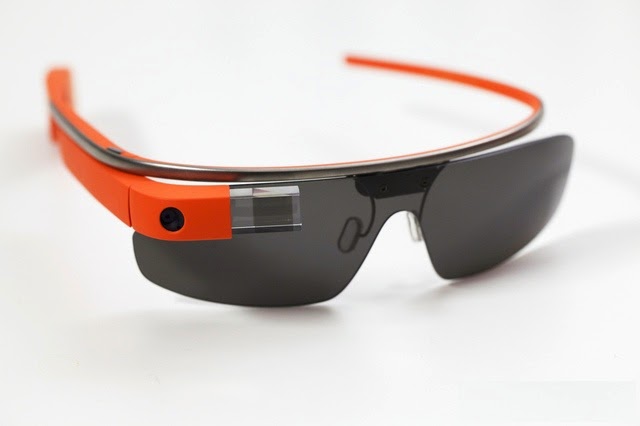
Google Glass, Android, Google, Glass, Wi-Fi, Bluetooth, RAM, touch pad, camera

Google Glass and its Camera

A 5 MP camera is available in Google Glass which has ability to take pictures and video recording with 720p

Google Glass and its Touch pad

A touch pad is available in Google Glass at the side of the device. This Touch pad is used to operate different function of Google Glass like if you slide it backward, Google Glass will display the current events. If you slide forward past events will be shown by Google Glass Display.

Voice command

Another smart function of Google Glass is its voice control. To activate the voice function just tap the touch pad, after activation you can control your Google Glass through voice command. You just have to say take picture, record video or similar commands to use voice command in your Google Glass.

Thursday, 9 January 2014

Lumo Lift - Track your life

A small gadget to track your daily life

Lumo Lift is a very small gadget offered by Lumo BodyTech. The width, height and thickness of the Lumo Lift are 1 inch, 1.75 inch and 0.25 inch respectively. Once Lumo Lift is fully charged it will works for five days and it can be recharged just in 2 hours.

Lumo Lift, gadget, Android, iOS, Nexus, Samsung S4, Lumo BodyTech, ipad, iphone, ipod

Lumo Lift is so small that it can be easily wear on your chest. It contains a sensor that senses your posture and records your sitting and standing up gestures. When you wear Lumo Lift and pair it with android or iOS app it starts working and leave messages for you like your daily taken steps, your daily burned calories etc. It also intimates you with vibrations feedback to help you stand firm and stay focused.
 
Lumo Lift only works with android and iOS app. The android phones which are compatible with the Lumo Lift are those having Android OS 4.3 and above but it is specially optimized for Samsung S3 and S4, Nexus 4 and 5, HTC One and Motorola G while Apple iPhones like 4S, 5 series, 5th generation iPod Touch, 3rd and 4th generation iPad and also iPad mini and iPad Air.

Monday, 6 January 2014

Android goes Car!

Google launches android for Automotive in collaboration with Honda, GM, Audi and more

Finally after Apple and Microsoft, Google steps forward in Automobile Industry. Google's alliance with top automotive companies for deployment of android-based solution opens a new market challenge for iOS in the car strategy. In a press release google unveiled the program details.

Google, Android, Car, Audi, GM, Honda, Automotive, Open Atuomotive Alliance


Google with collaborated automotive companies launched a new group called "The Open Automotive Alliance (OAA)".The Alliance also consist of NVidia the chip making company. In the last week of December 2013 the news was out for Google and Audi joint venture but it turns into a big deal with more companies than just Audi. In future more companies are expected to be the part of OAA.

First android integrated car is planned to be in market by the end of 2014.
Honda & GM already have introduced their cars with iOS features like Siri Eyes Free to be released in 2014 and 2015

Google, Android, Car, Audi, GM, Honda, Automotive, Open Atuomotive Alliance,


National Highways Traffic Safety Administration (NHTSA) is already approached by the Open Automotive Alliance to make sure the safety and reliability of the system in car use.
The google-based solution might comprise of facility to sync your android phone with your car. Voice command option, Google map and advance features like iOS’s Siri Eyes Free can be revealed in the coming time. Options are open, stay tuned for the coming features.

Sources:
http://www.businessweek.com/articles/2014-01-06/google-teams-with-gm-honda-and-audi-to-bring-android-to-cars
http://appleinsider.com/articles/14/01/06/ces-2014-gm-audi-hyundai-honda-nvidia-officially-join-googles-android-automotive-push
http://www.theverge.com/2014/1/6/5279116/google-open-automotive-alliance-android-car-announcement


Friday, 3 January 2014

Candy Crush Mystery Quest Cheat

Get your Candy Crush keys in just few minutes!

When you finish any episode in Candy Crush you need either help from your friends or need to play three quests to find keys for unlocking next Episode. 

This simple trick will help you to get three keys in few minutes for which you have to wait two days in your favorite Candy Crush game.

Below are the few easy steps: 

1) When you have finished your current episode, Candy Crush will ask you to play Quest and finish it by achieving the target score to get your first Key.

2) After getting your first key you have to wait for 24 hours for next Quest but upcoming steps will reduce it magically.

Candy Crush

3) Once you got first key exit the Candy Crush game and go to the date settings of your phone and advance the date to next day e.g. from 25-5-2013 to 26-5-2013

4) Now launch the Candy Crush game, you will be asked to play your next Quest to find your second key. 

Wait don’t play Candy Crush at this stage just exit the Candy Crush game by using home key (now you are at your home screen).

5) Again go to the date settings of your phone & revert back the date to the actual one.

6) Now again launch the Candy Crush game.

7) Play the Quest and clear it with target score so you can get your second key.

Yes you don’t had to wait for 24 hours :)

8) Now once again you have to wait for 24 hours to play next Quest for your third key but don’t you worry just follow the procedure mentioned above again and find you third key.

Note: If you unluckily failed to achieve your target score in quest, you won’t get any key but all you have to do is just go for another date changing process and you will have another fresh quest.

Apply the cheat and enjoy your Candy Crush :)

Thursday, 2 January 2014

How to get full lives for Candy crush in just 15 seconds - Awesome Candy Crush Cheat

How to get full lives for Candy crush in just 15 seconds - Awesome Candy Crush Cheat

This simple Cheat will refill lives in your all-time favorite game Candy crush just in 15 sec. All you have to do is follow the steps below.
 
Candy Crush

1) Once you have zero life exit the Candy Crush Game.
2) Go to the time setting of your phone and change the date to next day (i.e. if today is 1/12/2013, change it to 2/12/2013).
3) Save the time settings.
4) Launch the Candy Crush.

**Hurrah** its again full lives for Candy Crush in no time.


But wait.. Don’t play Game at this time!!


If you play Candy crush at this stage your game may crash or something weird happened to it.

5) After launching the Candy crush hit home button of your phone (don't exit game properly you just have to be on home screen of your phone).
6) Now again go back to time setting of your phone and revert back it to original date.
7) Launch the Candy crush again and enjoy!!

You can do this as many times as you want to enjoy full lives of Candy Crush.

Please provide your feedback and subscribe for more interesting tweaks.


Tuesday, 31 December 2013

Ubuntu for Phones – The next Step


Ubuntu is a Linux based open source and free-ware Operating system. After being "the world's most popular free OS”, Ubuntu is now entering in mobile industry. With advance and unique features "Ubuntu for phones" is available on Ubuntu's official website "for developers and industry partners only". It utilizes same drivers as android and make it easy to be run on android devices. Ubuntu for phones is an open source operating system and ready to download for any Developer, Operator or OEM who wants to customize OS, create new apps or design phones for Ubuntu. 

Ubuntu

As compare to now a days running smart phones OS Ubuntu comprises almost every feature; well designed, ready to use, managing your favourite apps, a search module, even with a whole world of apps and many more feature. Ubuntu for phones is loaded with a stylish welcome screen that can be personalized in a unique way. "This isn't so much a lock screen, it's a sign saying: Come in" stated at their official site.

One of the amazing feature that Ubuntu for phone comprises is "Superphone: that can be a PC". Utilizing any phone that is quad-core can also perform as a PC provided with special dock and Monitor.


There's also a Carrier Advisory Group (CAG) which is promoting and helping Ubuntu's mobile strategy. With new promising features and Open Source strategy (as of android) Ubuntu can be a new hit in Smart Phone OS industry.

Source: www.ubuntu.com/phone

Tuesday, 24 December 2013

Android- The Future


If you were one of the few who managed to get their hands on the Google Nexus 5 during the initial ordering rush, you’ve had some time to poke around and find some of the fun new things going on in Android 4.4. If you’ve been poking around in the developer console, you may have even seen a curious new runtime option. It may not mean a whole lot yet, but ART — the Android RunTime — is going to be the future of Android.

Most people with Android phones have no idea what Dalvik is, aside from maybe a distant cousin to a classic Doctor Who villain. The truth is Dalvik is what powers every Android phone on the planet. It’s a runtime environment that Android exists on top of, and it’s responsible for everything that is great and terrible about Android. For the last couple of years, Google has worked hard to optimize Android to be more efficient by adding things like a Just-In-Time compiler back in Android 2.2.

As fast as Android has become over the last few years, it is still bottlenecked in a few ways by Dalvik. Google plans to resolve this in future versions of Android with a new runtime environment specifically for Android.

The Android RunTime will operate in a totally different way from Dalvik, as it will be using an Ahead-Of-Time compiler. The primary difference here is how the code for the apps you want to run are compiled, which directly affects how they perform when launching apps or returning to apps that you’ve recently opened or are running in the background. This increased performance is expected to have a positive effect all across the OS, meaning better battery life and smoother app launches. It’s an all around positive thing, but it’s not quite ready for prime time yet.

Google included ART in the developer tools of Android 4.4 in order to prepare developers for what is coming to Android. As a user, you can switch to ART right now but it is unlikely that you’ll see any real difference in your day to day use. This mostly has to do with the absolutely screaming fast processor in the Nexus 5, coupled with the battery and network management hardware deployed on that phone. As Android 4.4 is rolled out to other devices that may change.

Eventually, Google will release a phone with ART running by default. Until that happens, it’s up to the brave few willing to poke around on their phones regardless of any instability or potential harm to the life of the device. If you happen to be one of those people, sound off with your thoughts on ART in the comments.